Spyctral’s Tutorial
This tutorial is a guide to use Spyctral package. Here we show, step by step, how to get started and the principal available options.
Install the library
[2]:
!pip install spyctral-tools
Collecting spyctral-tools
  Using cached spyctral_tools-0.0.1rc0-py3-none-any.whl.metadata (6.4 kB)
Requirement already satisfied: attrs in /home/ccerdosino/anaconda3/envs/spyctral/lib/python3.13/site-packages (from spyctral-tools) (25.1.0)
Collecting numpy (from spyctral-tools)
  Using cached numpy-2.2.3-cp313-cp313-manylinux_2_17_x86_64.manylinux2014_x86_64.whl.metadata (62 kB)
Requirement already satisfied: python-dateutil in /home/ccerdosino/anaconda3/envs/spyctral/lib/python3.13/site-packages (from spyctral-tools) (2.9.0.post0)
Collecting astropy (from spyctral-tools)
  Using cached astropy-7.0.1-cp313-cp313-manylinux_2_17_x86_64.manylinux2014_x86_64.whl.metadata (10 kB)
Collecting pandas (from spyctral-tools)
  Using cached pandas-2.2.3-cp313-cp313-manylinux_2_17_x86_64.manylinux2014_x86_64.whl.metadata (89 kB)
Collecting specutils (from spyctral-tools)
  Using cached specutils-1.19.0-py3-none-any.whl.metadata (6.0 kB)
Collecting matplotlib (from spyctral-tools)
  Using cached matplotlib-3.10.0-cp313-cp313-manylinux_2_17_x86_64.manylinux2014_x86_64.whl.metadata (11 kB)
Collecting pyerfa>=2.0.1.1 (from astropy->spyctral-tools)
  Using cached pyerfa-2.0.1.5-cp39-abi3-manylinux_2_17_x86_64.manylinux2014_x86_64.whl.metadata (5.7 kB)
Collecting astropy-iers-data>=0.2025.1.31.12.41.4 (from astropy->spyctral-tools)
  Using cached astropy_iers_data-0.2025.2.24.0.34.4-py3-none-any.whl.metadata (5.1 kB)
Requirement already satisfied: PyYAML>=6.0.0 in /home/ccerdosino/anaconda3/envs/spyctral/lib/python3.13/site-packages (from astropy->spyctral-tools) (6.0.2)
Requirement already satisfied: packaging>=22.0.0 in /home/ccerdosino/anaconda3/envs/spyctral/lib/python3.13/site-packages (from astropy->spyctral-tools) (24.2)
Collecting contourpy>=1.0.1 (from matplotlib->spyctral-tools)
  Using cached contourpy-1.3.1-cp313-cp313-manylinux_2_17_x86_64.manylinux2014_x86_64.whl.metadata (5.4 kB)
Collecting cycler>=0.10 (from matplotlib->spyctral-tools)
  Using cached cycler-0.12.1-py3-none-any.whl.metadata (3.8 kB)
Collecting fonttools>=4.22.0 (from matplotlib->spyctral-tools)
  Using cached fonttools-4.56.0-cp313-cp313-manylinux_2_5_x86_64.manylinux1_x86_64.manylinux_2_17_x86_64.manylinux2014_x86_64.whl.metadata (101 kB)
Collecting kiwisolver>=1.3.1 (from matplotlib->spyctral-tools)
  Using cached kiwisolver-1.4.8-cp313-cp313-manylinux_2_17_x86_64.manylinux2014_x86_64.whl.metadata (6.2 kB)
Collecting pillow>=8 (from matplotlib->spyctral-tools)
  Using cached pillow-11.1.0-cp313-cp313-manylinux_2_28_x86_64.whl.metadata (9.1 kB)
Collecting pyparsing>=2.3.1 (from matplotlib->spyctral-tools)
  Using cached pyparsing-3.2.1-py3-none-any.whl.metadata (5.0 kB)
Requirement already satisfied: six>=1.5 in /home/ccerdosino/anaconda3/envs/spyctral/lib/python3.13/site-packages (from python-dateutil->spyctral-tools) (1.17.0)
Collecting pytz>=2020.1 (from pandas->spyctral-tools)
  Using cached pytz-2025.1-py2.py3-none-any.whl.metadata (22 kB)
Collecting tzdata>=2022.7 (from pandas->spyctral-tools)
  Using cached tzdata-2025.1-py2.py3-none-any.whl.metadata (1.4 kB)
Collecting scipy>=1.3 (from specutils->spyctral-tools)
  Using cached scipy-1.15.2-cp313-cp313-manylinux_2_17_x86_64.manylinux2014_x86_64.whl.metadata (61 kB)
Collecting gwcs>=0.18 (from specutils->spyctral-tools)
  Using cached gwcs-0.24.0-py3-none-any.whl.metadata (6.3 kB)
Collecting asdf-astropy>=0.3 (from specutils->spyctral-tools)
  Using cached asdf_astropy-0.7.1-py3-none-any.whl.metadata (7.3 kB)
Collecting asdf>=2.14.4 (from specutils->spyctral-tools)
  Using cached asdf-4.1.0-py3-none-any.whl.metadata (14 kB)
Collecting ndcube>=2.0 (from specutils->spyctral-tools)
  Using cached ndcube-2.3.1-py3-none-any.whl.metadata (7.5 kB)
Collecting asdf-standard>=1.1.0 (from asdf>=2.14.4->specutils->spyctral-tools)
  Using cached asdf_standard-1.1.1-py3-none-any.whl.metadata (5.2 kB)
Collecting asdf-transform-schemas>=0.3 (from asdf>=2.14.4->specutils->spyctral-tools)
  Using cached asdf_transform_schemas-0.5.0-py3-none-any.whl.metadata (4.1 kB)
Collecting jmespath>=0.6.2 (from asdf>=2.14.4->specutils->spyctral-tools)
  Using cached jmespath-1.0.1-py3-none-any.whl.metadata (7.6 kB)
Collecting semantic_version>=2.8 (from asdf>=2.14.4->specutils->spyctral-tools)
  Using cached semantic_version-2.10.0-py2.py3-none-any.whl.metadata (9.7 kB)
Collecting asdf-coordinates-schemas>=0.3 (from asdf-astropy>=0.3->specutils->spyctral-tools)
  Using cached asdf_coordinates_schemas-0.3.0-py3-none-any.whl.metadata (4.1 kB)
Collecting asdf_wcs_schemas>=0.4.0 (from gwcs>=0.18->specutils->spyctral-tools)
  Using cached asdf_wcs_schemas-0.4.0-py3-none-any.whl.metadata (3.9 kB)
Using cached spyctral_tools-0.0.1rc0-py3-none-any.whl (21 kB)
Using cached astropy-7.0.1-cp313-cp313-manylinux_2_17_x86_64.manylinux2014_x86_64.whl (10.3 MB)
Using cached numpy-2.2.3-cp313-cp313-manylinux_2_17_x86_64.manylinux2014_x86_64.whl (16.1 MB)
Using cached matplotlib-3.10.0-cp313-cp313-manylinux_2_17_x86_64.manylinux2014_x86_64.whl (8.6 MB)
Using cached pandas-2.2.3-cp313-cp313-manylinux_2_17_x86_64.manylinux2014_x86_64.whl (12.7 MB)
Using cached specutils-1.19.0-py3-none-any.whl (4.9 MB)
Using cached asdf-4.1.0-py3-none-any.whl (961 kB)
Using cached asdf_astropy-0.7.1-py3-none-any.whl (93 kB)
Using cached astropy_iers_data-0.2025.2.24.0.34.4-py3-none-any.whl (1.9 MB)
Using cached contourpy-1.3.1-cp313-cp313-manylinux_2_17_x86_64.manylinux2014_x86_64.whl (322 kB)
Using cached cycler-0.12.1-py3-none-any.whl (8.3 kB)
Using cached fonttools-4.56.0-cp313-cp313-manylinux_2_5_x86_64.manylinux1_x86_64.manylinux_2_17_x86_64.manylinux2014_x86_64.whl (4.8 MB)
Using cached gwcs-0.24.0-py3-none-any.whl (169 kB)
Using cached kiwisolver-1.4.8-cp313-cp313-manylinux_2_17_x86_64.manylinux2014_x86_64.whl (1.5 MB)
Using cached ndcube-2.3.1-py3-none-any.whl (137 kB)
Using cached pillow-11.1.0-cp313-cp313-manylinux_2_28_x86_64.whl (4.5 MB)
Using cached pyerfa-2.0.1.5-cp39-abi3-manylinux_2_17_x86_64.manylinux2014_x86_64.whl (738 kB)
Using cached pyparsing-3.2.1-py3-none-any.whl (107 kB)
Using cached pytz-2025.1-py2.py3-none-any.whl (507 kB)
Using cached scipy-1.15.2-cp313-cp313-manylinux_2_17_x86_64.manylinux2014_x86_64.whl (37.3 MB)
Using cached tzdata-2025.1-py2.py3-none-any.whl (346 kB)
Using cached asdf_coordinates_schemas-0.3.0-py3-none-any.whl (33 kB)
Using cached asdf_standard-1.1.1-py3-none-any.whl (81 kB)
Using cached asdf_transform_schemas-0.5.0-py3-none-any.whl (275 kB)
Using cached asdf_wcs_schemas-0.4.0-py3-none-any.whl (45 kB)
Using cached jmespath-1.0.1-py3-none-any.whl (20 kB)
Using cached semantic_version-2.10.0-py2.py3-none-any.whl (15 kB)
Installing collected packages: pytz, tzdata, semantic_version, pyparsing, pillow, numpy, kiwisolver, jmespath, fonttools, cycler, astropy-iers-data, asdf-standard, scipy, pyerfa, pandas, contourpy, asdf-transform-schemas, matplotlib, astropy, asdf, asdf-coordinates-schemas, asdf_wcs_schemas, asdf-astropy, gwcs, ndcube, specutils, spyctral-tools
Successfully installed asdf-4.1.0 asdf-astropy-0.7.1 asdf-coordinates-schemas-0.3.0 asdf-standard-1.1.1 asdf-transform-schemas-0.5.0 asdf_wcs_schemas-0.4.0 astropy-7.0.1 astropy-iers-data-0.2025.2.24.0.34.4 contourpy-1.3.1 cycler-0.12.1 fonttools-4.56.0 gwcs-0.24.0 jmespath-1.0.1 kiwisolver-1.4.8 matplotlib-3.10.0 ndcube-2.3.1 numpy-2.2.3 pandas-2.2.3 pillow-11.1.0 pyerfa-2.0.1.5 pyparsing-3.2.1 pytz-2025.1 scipy-1.15.2 semantic_version-2.10.0 specutils-1.19.0 spyctral-tools-0.0.1rc0 tzdata-2025.1
Import packages
The first thing to do is import the necessary libraries. In general, you will need the following:
spyctral: the library that we present in this tutorial.numpy: to manipulate arrays.matplotlib.pyplot: to create and customize a wide range of static, animated, and interactive plots.os: to interact with the operating system, such as handling file paths and managing directories.csv: to read and write CSV files, which are commonly used for storing tabular data.
Note: In this tutorial, we assume that you already have experience using these libraries.
[3]:
import spyctral as spy
import numpy as np
import os
import csv
import matplotlib.pyplot as plt
Load the data
Next step is load the data. Spyctral needs a minimum of one text file and you need to know the source code of the file to be analysed to use the correct read function.
The file path is the only mandatory setting in read functions and you must be sure to incluide the correct file/files path. You can also include extra configuration like asign the object name or the ammount of decimals to get the parameters values. Explore all the different options for each read function with help task to adapt it to your needs.
Single loading
For this tutorial step we will use a data file available in test folder for your try as well.
[4]:
star_object_1 = spy.read_fisa('../../tests/datasets/case_SC_FISA.fisa')
[5]:
star_object_2 = spy.read_starlight('../../tests/datasets/case_SC_Starlight.out', object_name='object_2')
Those lines created two SpectralSummary objects that store all the information from FISA and STARLIGHT files. Here we show the objects and how they save the data.
[6]:
star_object_1
[6]:
<SpectralSummary(
  header={fisa_version, date_time, reddening, adopted_template, normalization_point, spectra_names},
  data={Unreddened_spectrum, Template_spectrum, Observed_spectrum, Residual_flux},
  age, reddening, av_value, normalization_point, z_value,
  spectra={Unreddened_spectrum, Template_spectrum, Observed_spectrum, Residual_flux},
  extra_info={str_template, name_template, age_map, error_age_map, z_map})>
[7]:
star_object_2
[7]:
<SpectralSummary(
  header={Date, Cid@UFSC, arq_obs, arq_base, arq_masks, arq_config, N_base, N_YAV_components, i_FitPowerLaw, alpha_PowerLaw, red_law_option, q_norm, l_ini, l_fin, dl, l_norm, llow_norm, lupp_norm, fobs_norm, llow_SN, lupp_SN, S_N_in_S_N_window, S_N_in_norm_window, S_N_err_in_S_N_window, S_N_err_in_norm_window, fscale_chi2, idum_orig, NOl_eff, Nl_eff, Ntot_cliped, clip_method, Nglobal_steps, N_chains, NEX0s_base, Clip_Bug, RC_Crash, Burn_In, n_censored_weights, wei_nsig_threshold, wei_limit, idt_all, wdt_TotTime, wdt_UsrTime, wdt_SysTime, chi2_Nl_eff, adev, sum_of_x, Flux_tot, Mini_tot, Mcor_tot, v0_min, vd_min, AV_min, YAV_min, Nl_obs},
  data={synthetic_spectrum, synthetic_results, results_average_chains_xj, results_average_chains_mj, results_average_chains_Av_chi2_mass},
  age, reddening, av_value, normalization_point, z_value,
  spectra={synthetic_spectrum, observed_spectrum, residual_spectrum},
  extra_info={xj_percent, age_decimals, rv, z_decimals, ssps_vector, synthesis_info, average_log_age})>
Set loading
If you have a set of files, you can load all the files at once. To make that you can define the files list and their folder path. For example we select a set of 15 STARLIGHT files, and we save the objects from each file in a dictionary ss_objects.
[10]:
folder_files_path ='../../tests/datasets/set_STARLIGHT_files'
[12]:
files_list = [f for f in os.listdir(folder_files_path) if os.path.isfile(os.path.join(folder_files_path, f)) and f.endswith('.out')]
[13]:
ss_objects = {}
for idx, file in enumerate(files_list):
    var_name = f"ss_obj_{idx}"
    ss_objects[var_name] = spy.read_starlight(f'{folder_files_path}/{file}', object_name=file)
[14]:
len(ss_objects)
[14]:
30
[15]:
ss_objects['ss_obj_1']
[15]:
<SpectralSummary(
  header={Date, Cid@UFSC, arq_obs, arq_base, arq_masks, arq_config, N_base, N_YAV_components, i_FitPowerLaw, alpha_PowerLaw, red_law_option, q_norm, l_ini, l_fin, dl, l_norm, llow_norm, lupp_norm, fobs_norm, llow_SN, lupp_SN, S_N_in_S_N_window, S_N_in_norm_window, S_N_err_in_S_N_window, S_N_err_in_norm_window, fscale_chi2, idum_orig, NOl_eff, Nl_eff, Ntot_cliped, clip_method, Nglobal_steps, N_chains, NEX0s_base, Clip_Bug, RC_Crash, Burn_In, n_censored_weights, wei_nsig_threshold, wei_limit, idt_all, wdt_TotTime, wdt_UsrTime, wdt_SysTime, chi2_Nl_eff, adev, sum_of_x, Flux_tot, Mini_tot, Mcor_tot, v0_min, vd_min, AV_min, YAV_min, Nl_obs},
  data={synthetic_spectrum, synthetic_results, results_average_chains_xj, results_average_chains_mj, results_average_chains_Av_chi2_mass},
  age, reddening, av_value, normalization_point, z_value,
  spectra={synthetic_spectrum, observed_spectrum, residual_spectrum},
  extra_info={xj_percent, age_decimals, rv, z_decimals, ssps_vector, synthesis_info, average_log_age})>
[16]:
ss_objects['ss_obj_14']
[16]:
<SpectralSummary(
  header={Date, Cid@UFSC, arq_obs, arq_base, arq_masks, arq_config, N_base, N_YAV_components, i_FitPowerLaw, alpha_PowerLaw, red_law_option, q_norm, l_ini, l_fin, dl, l_norm, llow_norm, lupp_norm, fobs_norm, llow_SN, lupp_SN, S_N_in_S_N_window, S_N_in_norm_window, S_N_err_in_S_N_window, S_N_err_in_norm_window, fscale_chi2, idum_orig, NOl_eff, Nl_eff, Ntot_cliped, clip_method, Nglobal_steps, N_chains, NEX0s_base, Clip_Bug, RC_Crash, Burn_In, n_censored_weights, wei_nsig_threshold, wei_limit, idt_all, wdt_TotTime, wdt_UsrTime, wdt_SysTime, chi2_Nl_eff, adev, sum_of_x, Flux_tot, Mini_tot, Mcor_tot, v0_min, vd_min, AV_min, YAV_min, Nl_obs},
  data={synthetic_spectrum, synthetic_results, results_average_chains_xj, results_average_chains_mj, results_average_chains_Av_chi2_mass},
  age, reddening, av_value, normalization_point, z_value,
  spectra={synthetic_spectrum, observed_spectrum, residual_spectrum},
  extra_info={xj_percent, age_decimals, rv, z_decimals, ssps_vector, synthesis_info, average_log_age})>
Note: The next steps are available for all SpectralSummary, we make the showing with the second one for simplicity.
Getting data information
The created object contains several atributes and methods. You can obtain the object name, header information, spectra tables, age, reddening and other parameters. Here we show how to get some of them:
[17]:
star_object_2.header
[17]:
<header {'i_FitPowerLaw', 'arq_config', 'fobs_norm', 'red_law_option', 'AV_min', 'N_YAV_components', 'Nl_eff', 'idt_all', 'Cid@UFSC', 'clip_method', 'Flux_tot', 'arq_base', 'llow_norm', 'vd_min', 'Nglobal_steps', 'dl', 'Ntot_cliped', 'n_censored_weights', 'NOl_eff', 'lupp_norm', 'wdt_SysTime', 'wei_limit', 'Clip_Bug', 'l_norm', 'idum_orig', 'llow_SN', 'N_chains', 'Nl_obs', 'S_N_err_in_norm_window', 'alpha_PowerLaw', 'Date', 'q_norm', 'S_N_err_in_S_N_window', 'chi2_Nl_eff', 'N_base', 'sum_of_x', 'Burn_In', 'fscale_chi2', 'v0_min', 'adev', 'Mini_tot', 'lupp_SN', 'arq_obs', 'YAV_min', 'S_N_in_norm_window', 'arq_masks', 'l_fin', 'wei_nsig_threshold', 'S_N_in_S_N_window', 'wdt_TotTime', 'NEX0s_base', 'RC_Crash', 'l_ini', 'Mcor_tot', 'wdt_UsrTime'}>
[18]:
star_object_2.data
[18]:
<data {'results_average_chains_xj', 'results_average_chains_mj', 'results_average_chains_Av_chi2_mass', 'synthetic_results', 'synthetic_spectrum'}>
[19]:
star_object_2.extra_info
[19]:
<extra {'synthesis_info', 'age_decimals', 'z_decimals', 'ssps_vector', 'average_log_age', 'rv', 'xj_percent'}>
[20]:
ssps_vector = star_object_2.extra_info.ssps_vector
ssps_vector
[20]:
| j | x_j | Mini_j | Mcor_j | age_j | Z_j | _j | YAV | Mstars | component_j | a/Fe | SSP_chi2r | SSP_adev | SSP_AV | SSP_x | |
|---|---|---|---|---|---|---|---|---|---|---|---|---|---|---|---|
| 0 | 5.0 | 13.323198 | 0.081313 | 0.1334 | 8.710000e+06 | 0.004 | 0.017050 | 0.0 | 0.8983 | 0.8983 | 0.0 | 4.6516 | 4.4419 | 2.4721 | 92.8005 |
| 1 | 16.0 | 33.277591 | 12.942000 | 13.7960 | 1.278050e+09 | 0.004 | 0.000267 | 0.0 | 0.5837 | 0.5837 | 0.0 | 2.0388 | 2.8490 | 0.4472 | 100.5466 |
| 2 | 39.0 | 53.399210 | 24.894000 | 26.8560 | 1.278050e+09 | 0.008 | 0.000223 | 0.0 | 0.5907 | 0.5907 | 0.0 | 2.8045 | 3.2546 | 0.3218 | 101.3126 |
[21]:
ssps_ages = star_object_2.extra_info.ssps_vector.age_j
ssps_ages
[21]:
0    8.710000e+06
1    1.278050e+09
2    1.278050e+09
Name: age_j, dtype: float64
[22]:
star_object_2.age
[22]:
1108933312.92
[23]:
star_object_2.z_value
[23]:
0.006
[24]:
star_object_2.reddening
[24]:
0.2533548387096774
These methods are:
header_info_dfget_spectrum()feh_ratioget_all_propertiesplot
[25]:
df_header_info = star_object_2.header_info_df
df_header_info
[25]:
| value | |
|---|---|
| Date | 2007-04-01 00:00:00 |
| Cid@UFSC | OUTPUT of StarlightChains_v04.for |
| arq_obs | SL573_1922_n4020.dat |
| arq_base | Base.BC03.Sbmm |
| arq_masks | Mask.txt |
| arq_config | StCv04.C11.config |
| N_base | 69.0 |
| N_YAV_components | 0.0 |
| i_FitPowerLaw | 0.0 |
| alpha_PowerLaw | -9.99 |
| red_law_option | CCM |
| q_norm | 1.458241 |
| l_ini | 3808.0 |
| l_fin | 6854.0 |
| dl | 2.0 |
| l_norm | 4020.0 |
| llow_norm | 4010.0 |
| lupp_norm | 4030.0 |
| fobs_norm | 1.010416 |
| llow_SN | 5500.97 |
| lupp_SN | 5700.97 |
| S_N_in_S_N_window | 42.952 |
| S_N_in_norm_window | 36.115 |
| S_N_err_in_S_N_window | 42.952 |
| S_N_err_in_norm_window | 36.115 |
| fscale_chi2 | 1.0 |
| idum_orig | -2007200.0 |
| NOl_eff | 1524.0 |
| Nl_eff | 1458.0 |
| Ntot_cliped | 66.0 |
| clip_method | NSIGMA |
| Nglobal_steps | 2387560.0 |
| N_chains | 7.0 |
| NEX0s_base | 31.0 |
| Clip_Bug | 0.0 |
| RC_Crash | 0.0 |
| Burn_In | 1.0 |
| n_censored_weights | 0.0 |
| wei_nsig_threshold | 2.0 |
| wei_limit | 36.12 |
| idt_all | 26.0 |
| wdt_TotTime | 26.506 |
| wdt_UsrTime | 26.486 |
| wdt_SysTime | 0.02 |
| chi2_Nl_eff | 1.22947 |
| adev | 2.30437 |
| sum_of_x | 102.66808 |
| Flux_tot | 2.97885 |
| Mini_tot | 16876.3 |
| Mcor_tot | 9240.6 |
| v0_min | 164.96 |
| vd_min | 330.07 |
| AV_min | 0.7854 |
| YAV_min | 0.0 |
| Nl_obs | 1524.0 |
[26]:
star_object_2.spectra.observed_spectrum
[26]:
<Spectrum1D(flux=[0.77398 ... 1.17066] (shape=(1524,), mean=1.11161); spectral_axis=<SpectralAxis [3808. 3810. 3812. ... 6850. 6852. 6854.] Angstrom> (length=1524))>
[27]:
star_object_2.feh_ratio
[27]:
np.float64(-0.5006023505691852)
The get_all_properties method creates a DataFrame containing all relevant parameters of the instance. Numerical values are formatted to display in scientific notation where necessary.
[28]:
star_object_2.get_all_properties
[28]:
| Property | Value | |
|---|---|---|
| 0 | object_name | object_2 |
| 1 | age | 1.11e+09 |
| 2 | err_age | 4.31e+08 |
| 3 | reddening | 0.253355 |
| 4 | av_value | 0.7854 |
| 5 | z_value | 0.006 |
| 6 | feh_ratio | -0.500602 |
| 7 | normalization_point | 4020.0 |
Using the values
It’s possible to work with each value and make separed calculations:
[29]:
object_age = star_object_2.age
[30]:
log_object_age = np.log10(object_age)
print(log_object_age)
9.04490543009716
[31]:
average_age = np.average(ssps_ages)
print(np.log10(average_age))
8.931933943575011
[32]:
median_age = np.median(ssps_ages)
print(median_age)
print(np.log10(median_age))
1278050000.0
9.106547844666926
Saving data
Using cvs library you can save the information in the objects. Here is how to do it for header information:
[28]:
output_file = 'output_file_name.txt'

df_fixed = df_header_info.reset_index()
df_fixed.columns = ['Parameter', 'Value']

with open(output_file, 'w', newline='') as f:
    writer = csv.writer(f, delimiter='\t')
    writer.writerow(df_fixed.columns)
    writer.writerows(df_fixed.values)

print(f"File saved as: {output_file}")
File saved as: output_file_name.txt
[29]:
output_file = 'ssps_vector.txt'

df_fixed = ssps_vector.reset_index()

with open(output_file, 'w', newline='') as f:
    writer = csv.writer(f, delimiter='\t')
    writer.writerow(df_fixed.columns)
    writer.writerows(df_fixed.values)

print(f"File saved as: {output_file}")
File saved as: ssps_vector.txt
Plotting spectra
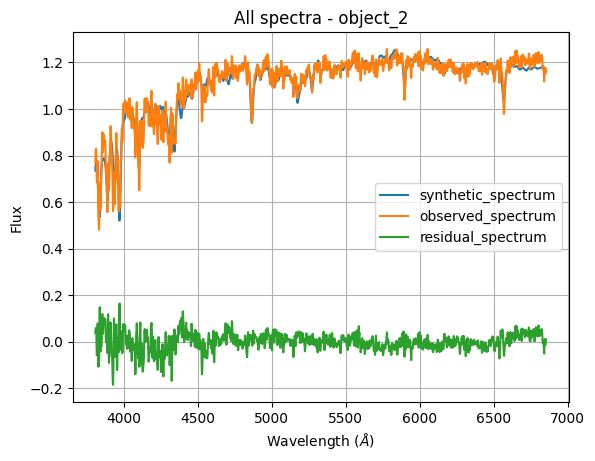
The plot method returns a SpectralPlotter object to generate plots from spectral data provided by a SpectralSummary object. Spectra plotting can be done in several ways:
All spectra
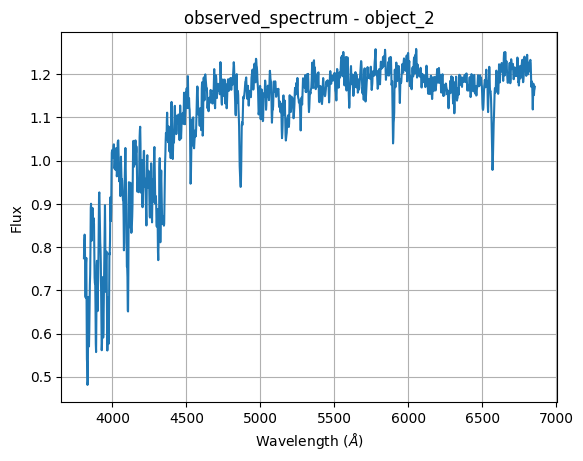
Plot a single spectrum
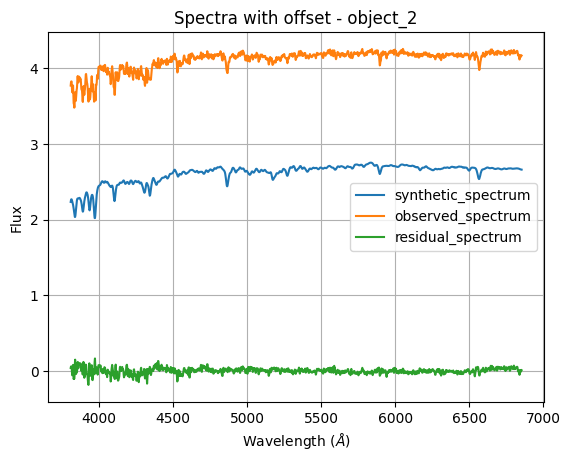
All spectra with an offset spacing
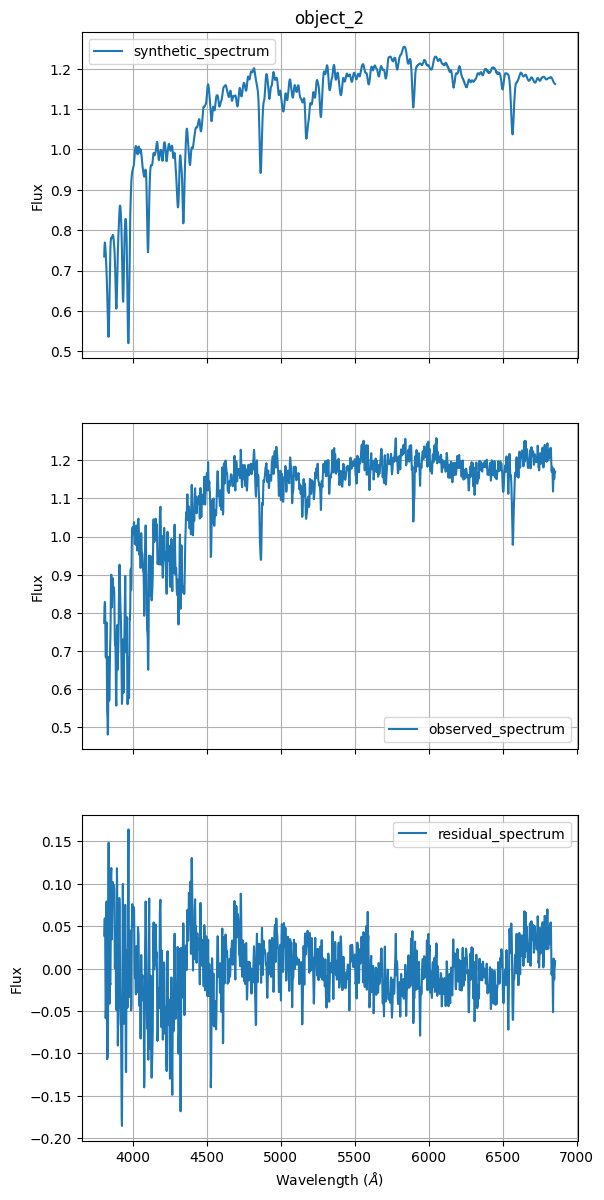
Subplot indivual spectrum
Note: By default the plot method use the .all_spectra()
Plotting all spectra
[33]:
star_object_2.plot()
[33]:
<Axes: title={'center': 'All spectra - object_2'}, xlabel='Wavelength ($\\AA$)', ylabel='Flux'>
Single spectrum plot
[34]:
star_object_2.plot.single('observed_spectrum')
[34]:
<Axes: title={'center': 'observed_spectrum - object_2'}, xlabel='Wavelength ($\\AA$)', ylabel='Flux'>
Splited spectra
[35]:
star_object_2.plot.split(1.5)
[35]:
<Axes: title={'center': 'Spectra with offset - object_2'}, xlabel='Wavelength ($\\AA$)', ylabel='Flux'>
Subplotting all spectra
[36]:
star_object_2.plot.subplots()
[36]:
array([<Axes: title={'center': 'object_2'}, ylabel='Flux'>,
       <Axes: ylabel='Flux'>,
       <Axes: xlabel='Wavelength ($\\AA$)', ylabel='Flux'>], dtype=object)
Comparing plots
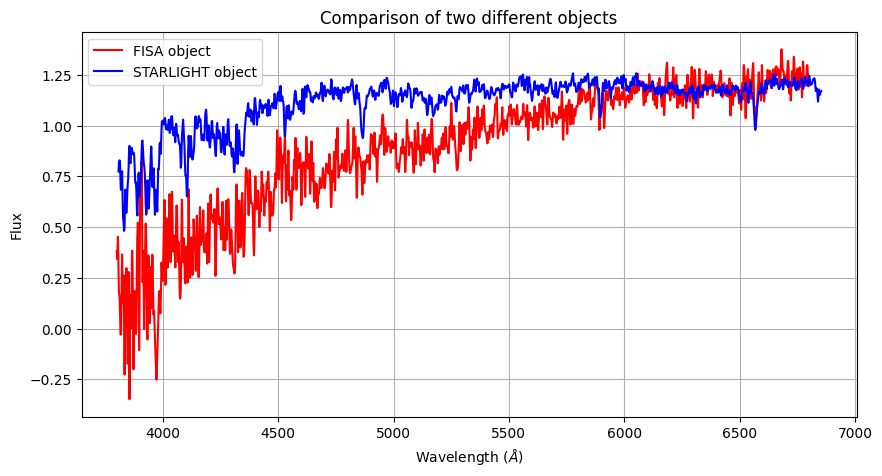
In astronomical analysis is important to compare the spectrum and is very simple to make it using the tools from Spectuils and Matplotliblibraries. First you could save the spectrum in new variables:
[37]:
plt.figure(figsize=(10, 5))
star_object_1.plot.single('Observed_spectrum', label="FISA object", color='red')
star_object_2.plot.single('observed_spectrum', label="STARLIGHT object", color='blue')

plt.title("Comparison of two different objects")
plt.legend()
plt.show()
Setting your preference in plots
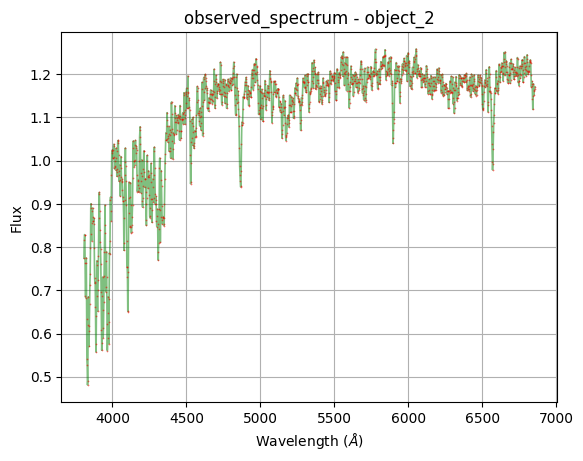
You can set your personal configuration plot. Plots are based on the Matplotlib library; hence, its characteristics may be used.
[38]:
star_object_2.plot.single(
    'observed_spectrum',
    color = 'green',
    linestyle = '-',
    linewidth = 1.2,
    marker = '*',
    markersize = 0.7,
    markeredgecolor = 'red',
    alpha = 0.5
)
[38]:
<Axes: title={'center': 'observed_spectrum - object_2'}, xlabel='Wavelength ($\\AA$)', ylabel='Flux'>
NOTE: All the files used in this tutorial are vailable for you in test directory.
[ ]: